25 Web Connector
Use this guide for a public website connector. Web has no provider credentials. Nous fetches and indexes public pages that the website allows it to read.
25.1 What is indexed or searched live
The connector indexes pages from the configured public base URL. It follows the selected scrape method and supported links. It cannot index a page that needs login, a private network route, or a blocked request.
25.2 Administrator role and authentication
No credentials are required. A website administrator should approve the crawl, check the site’s robots and rate-limit policy, and provide a stable public URL. Do not use the connector to bypass access controls.
25.3 Provider setup and permissions
Confirm that the base URL is public HTTPS and that the site’s robots policy allows the intended crawl. Use a small scope first. Remove private query strings and tracking parameters from the base URL.
25.4 Setup form fields
| Field | What to enter |
|---|---|
| Name | A unique workspace connector name. |
| Base URL | The public HTTPS URL to crawl, for example https://docs.example.com/. |
| Scrape Method | Choose recursive, single, or sitemap. |
| Scroll before scraping | Turn on when content loads only after page scrolling. |
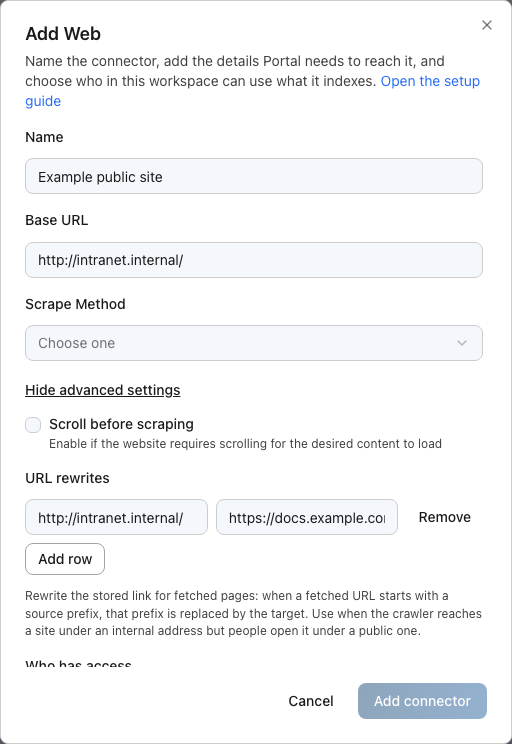
| Who has access | Choose Everyone in the workspace or Specific Teams. |
| URL rewrites | Optional. Property pairs: source prefix → target prefix. Advanced section. |
Use single for one page, recursive for linked pages under the site, and sitemap when the site publishes a sitemap with the desired URLs.
25.4.1 URL rewrites for mirrored sites
Open Show advanced settings in the Portal setup dialog to find URL rewrites. Use it when the crawler reaches the site under one address but people open the same pages under another, as with an internal mirror and its public site. Each pair maps a source prefix to a target prefix: Nous fetches the page under the source prefix but stores and links it under the target prefix. For example, the pair http://intranet.internal/ → https://docs.example.com/ lets Nous read the intranet copy while search results and citations point at the public address. Rewrites change stored document links only; they do not change which sites the connector may read.
25.5 Workspace and Team access
The web source is public at the provider. Nous access still controls who can search the indexed copy. Use Specific Teams when the content is for a limited workspace audience. Portal manages Team membership.
25.6 Test the connection
- Save the connector and wait for source sync and search indexing.
- Check that the expected URL appears in the document list.
- Search for a distinctive phrase from the page.
- Check a linked page when using recursive mode.
- Test the intended Workspace or Team audience.
25.7 Common errors
| Error | Action |
|---|---|
| URL is not public | Publish the page over HTTPS or use a different public URL. |
| Sitemap returns no pages | Check the sitemap URL and that it lists the intended pages. |
| Page needs a login | Web has no credentials. Publish a safe public page or use an authenticated provider connector. |
| Dynamic content is missing | Enable Scroll before scraping or use a source that exposes the content in HTML. |
25.8 Reconnect, rotate, and remove
Web has no credential to rotate. Edit the base URL or scrape method, then run a new sync. Before removal, check document sets, agents, and Team shares.